The Phenyx Pro PAS-225X is an active antenna distribution system. It lets several wireless microphone receivers share one pair of antenna paddles, which keeps stages tidy and helps maintain stable audio when many wireless systems run at once. This guide walks through setup and use.
Jump to: Single system · Multiple systems · Gain · Placement tips · Distributor vs combiner
Single system setup
Before you start, make sure your wireless microphone systems operate within the PAS-225X's supported range of 400-950 MHz.
1. Mount the splitter
For a desk or flat surface, attach the included adhesive rubber feet to the bottom of the unit. For a rack, use a standard 19-inch rack and secure the metal brackets with suitable screws (not included).
2. Connect the coaxial cables
The PAS-225X has 8 RF output jacks, so it can feed up to 8 receiver antenna inputs. Use the included short BNC cables (21 in) to connect the left and right RF outputs to the antenna jacks on each receiver. Divide the receivers into two groups and connect them to the Band A and Band B RF outputs.
3. Connect power
The unit has four 12 V DC power outputs for up to four wireless receivers, and four DC power cables are included to keep cabling neat.

4. Connect the antenna paddles
Use the longer BNC cables (9.5 ft) to connect each directional antenna paddle to the ANT input jacks on the splitter. Directional paddles are most sensitive to signals from the front, so place them high and aim them at the area where your microphones will be used.
5. Power up and pair
Power on the PAS-225X and the receivers, pair each microphone with its receiver, then adjust gain (up to 8 dB in 16 steps). Do a sound check before live use.

Tip: when you use a single PAS-225X, the cascade ports let you connect an extra pair of antennas from a wireless receiver.
Multiple systems setup
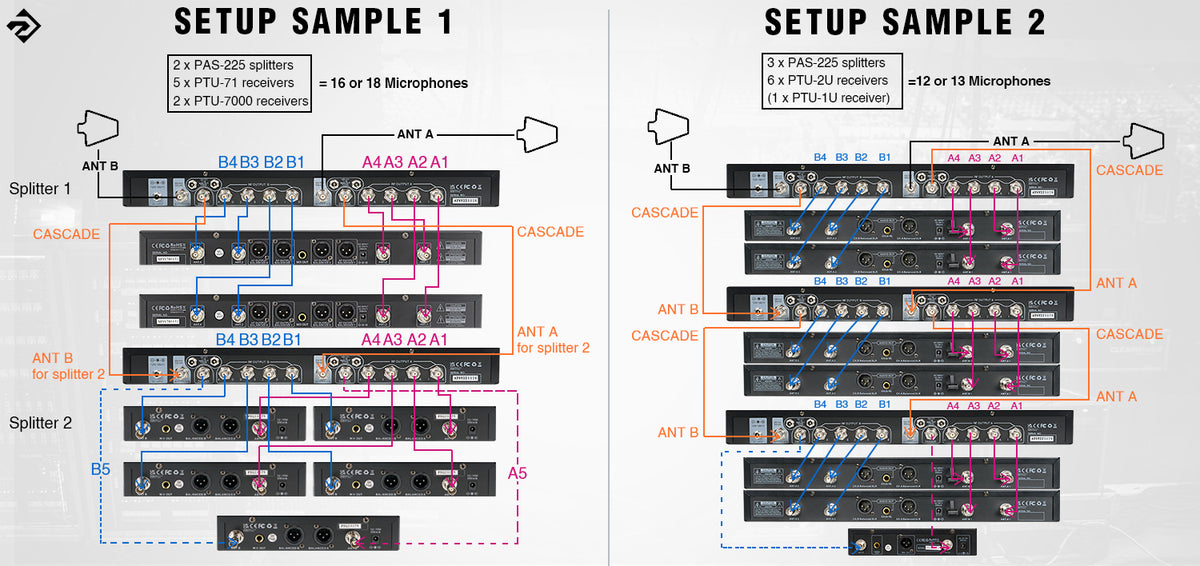
If you need more than 10 antenna inputs (typically more than five dual-channel receivers), connect two or more PAS-225X units in parallel through the cascade ports. Use two 21-inch BNC cables to link the cascade ports of one splitter to the ANT inputs of the next, so the splitters share the same pair of antenna paddles.
Important: too many wireless channels in one place overcrowd the RF environment and can overload the antennas, causing signal loss. For the most stable result, use no more than three PAS-225X units together.
Gain setting
The included BNC cables add about 0.7 dB of signal loss, and further loss comes from distance and multipath cancellation. To compensate, set the gain above about 3 dB. Avoid excessive gain, since too much amplification can cause dropouts and noise. The right amount gives a better signal-to-noise ratio and cleaner audio.
Placement tips
- Keep at least 60 cm (3 ft) of clear space around each antenna paddle.
- Remove barriers between the two antenna paddles.
- Avoid large metal objects in the line of sight.
- Keep people and objects out of the path between transmitters and paddles where you can.
- Stay away from lots of personal electronics such as phones and laptops.
Antenna distributor vs antenna combiner
Many people confuse the two. In a wireless microphone system, microphones transmit to receivers. The PAS-225X collects those RF signals through its antenna paddles and shares them with several receivers, so it suits wireless microphone systems only.
An antenna combiner works in reverse. It gathers signals from several in-ear monitor (IEM) transmitters and sends them through one antenna to the bodypack receivers. For IEM systems, see our PAS-227X antenna combiner guide.


Need help with your wireless setup?
Browse wireless microphone systems stocked in Australia, or talk to the MSM AV team.
Shop wireless microphones Contact us